Description
Motion Sensor Intelligence
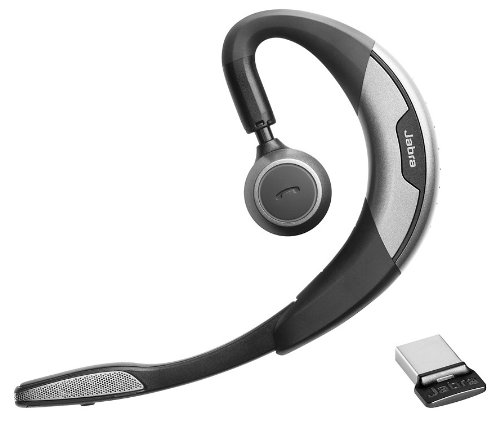
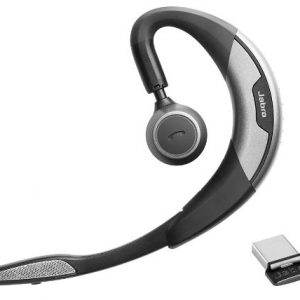
Jabra Motion UC is the ultimate headset featuring a unique intelligent motion sensor that allows you to effortlessly take or make that important call wherever you are. Featuring the best that the latest technology has to offer, Jabra Motion UC is above and beyond your expectations. With the built-in motion sensor and advanced microphones, the headset intelligently adapts the sound to your surroundings when you’re on-the-go or working in the office. The motion sensor also allows you to intuitively handle your calls – simply pick up the headset and put it on your ear to automatically answer a call.
Jabra Motion UC also lets you connect to practically any Bluetooth-enabled device, making it easy to seamlessly switch between your tablet, PC or smartphone. The headset comes with a USB adapter, which allows you to take or make internet calls via your PC and still be connected to you smartphone, tablet or other device. Your wireless freedom is thereby enhanced by a 10x longer Bluetooth range to you PC or laptop. Jabra Motion is really the only headset you’ll need for all your devices.
Jabra Motion UC has been designed with your personalized comfort in mind – with Jabra’s legacy of the behind-the-ear wearing style and unique height adjustment of the speaker tower, you can wear the headset in a way that makes you feel most comfortable. And when you’re done using it, simply fold the flip-boom arm and put the headset in your pocket to take it with you.
Jabra Motion UC also features NFC technology* for easy pairing – simply tap the headset on your smartphone* and you’re easily connected to take and make calls or stream your favorite multimedia – music, GPS and podcasts.
Connecting the Motion
Connecting with a Bluetooth Device
1. While pressing the Call button, open the flip boom-arm. Release the Call button when the Bluetooth light flashes blue.
2. Wear on the ear and follow the voice-guided connection instructions.
Connecting with the Jabra Link 360
1. Plug the Jabra Link 360 Nano Bluetooth USB adapter into any available USB port on your PC.
2. Open the flip boom-arm on the headset to connect to the Jabra Link 360.

Garmin Forerunner 235
MSI RX 580 GAMING X 4G, 8G Radeon RX 580 GDDR5 4GB CrossFire VR Ready FinFET DirectX 12 Graphics Card
ASUS ROG-STRIX-RX580-O8G-GAMINGOC Edition GDDR5 DP HDMI DVI VR Ready AMD Graphics Card
Apple iPhone 12 Pro 256GB Blue
Gamer PC with monitor Intel i9-9900K 27 inch RTX 2080 8GB Complete set computer
EVGA GeForce GTX 1080 FTW2 GAMING, 8GB GDDR5X, iCX Technology - 9 Thermal Sensors & RGB LED G/P/M, 08G-P4-6686-KR
Garmin vivoactive 3
JBL Clip 2 Waterproof Portable Bluetooth Speaker
Nebra Outdoor Helium Hotspot Miner HNT
Garmin Swim Watch with Garmin Connect
Sony X950H 65" Class HDR 4K UHD Smart LED TV
New Alienware Area 51M 17.3" FHD 144Hz Tobii i7-9700 16GB 1TB SSHD GTX 1660TI
Garmin Approach S60 GPS Golf Watch With Black Silicone Band
Apple iPhone 11 64GB Black
Apple iPhone 11 Pro 256GB Gold
Janome Memory Craft 6600P Professional Computerized Sewing Machine
Antminer S19 PRO – 110 TH/s
Accu-Chek Aviva Plus - 50 Ct
Apple iPhone 11 64GB (Product) Red
MSI GT75 17.3" 4K Ultra HD Gaming Laptop - Intel Core i9 - 32GB Memory 1TB Hard Drive + 512GB
Apple iPhone 11 Pro 64GB Space Gray
Garmin vivofit active 3
Airqino
Devialet Phantom - High-end wireless speaker - 1200 Watts - 101 dB
DEWALT DCB115 MAX Lithium Ion Battery Charger, 12V-20V
ASUS ROG-STRIX-GTX1080TI-O11G-GAMING GeForce 11GB OC Edition VR Ready 5K HD Gaming HDMI DisplayPort DVI PC GDDR5X
SENSECAP M1 LoRaWAN indoor gateway
JBL Cinema SB150
Samsung QN65Q9F Flat 65” QLED 4K UHD 9 Series Smart TV 2018 


There are no reviews yet.